# March 16th, 2023

<details>

<summary>General Error report</summary>

You can create a report when there's error and this page appear. When you click Report you will be redirected to freshdesk site and you can add the report there.

![](https://2956386150-files.gitbook.io/~/files/v0/b/gitbook-x-prod.appspot.com/o/spaces%2FvFIDgYJZjVR6TE8RehtK%2Fuploads%2FE6mW7b790JcJzYRlhU35%2FCRM%20General%20Error.png?alt=media\&token=d299f7f4-0e86-4986-864e-62d8b739c3ab)

</details>

<details>

<summary>Adding Disclaimer for CMS</summary>

In CMS app go to Description page, when you create a new description you can choose to create a disclaimer. Choose category to `disclaimer` and fill out the required fields. The disclaimer will show up in the bottom of the web page.

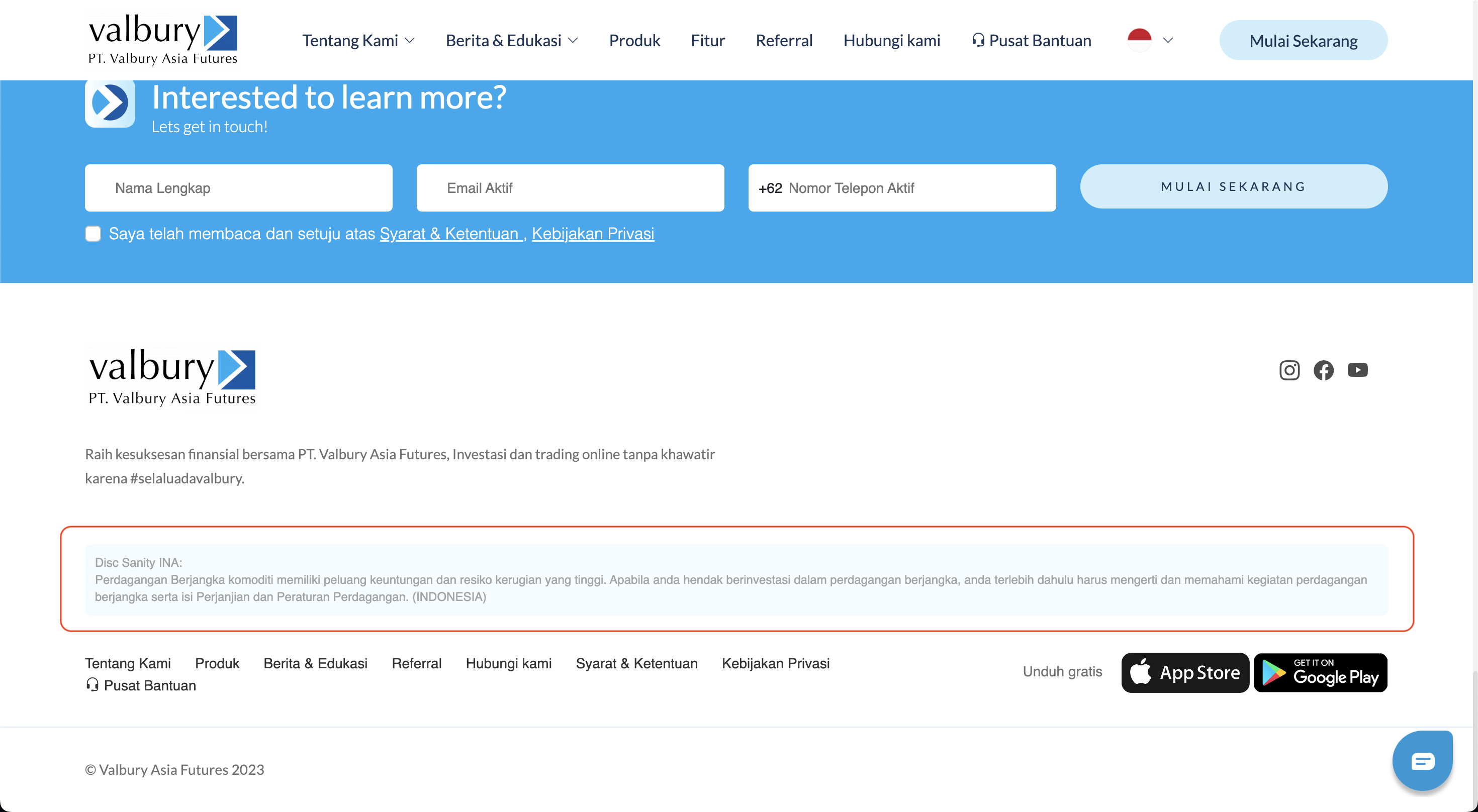
<img src="https://2956386150-files.gitbook.io/~/files/v0/b/gitbook-x-prod.appspot.com/o/spaces%2FvFIDgYJZjVR6TE8RehtK%2Fuploads%2Fm75BIHc4wfkipfRfaP6U%2FScreenshot%202023-02-21%20at%2011.38.29.png?alt=media&#x26;token=3e2aa1c9-662c-48b5-a9ce-7b1c1f9ae597" alt="" data-size="original">

<img src="https://2956386150-files.gitbook.io/~/files/v0/b/gitbook-x-prod.appspot.com/o/spaces%2FvFIDgYJZjVR6TE8RehtK%2Fuploads%2FYdbvV7nXJJvlWbhFzujp%2FScreenshot%202023-02-21%20at%2011.41.13.png?alt=media&#x26;token=1642c14d-da3e-4c12-9690-da34caf776e7" alt="" data-size="original">

</details>

<details>

<summary>Adding Submit status in Staff List</summary>

When admin already have the documents uploaded to their account in staff list and request review from HR for this candidate, then admin have to update this candidate status to `Submit`
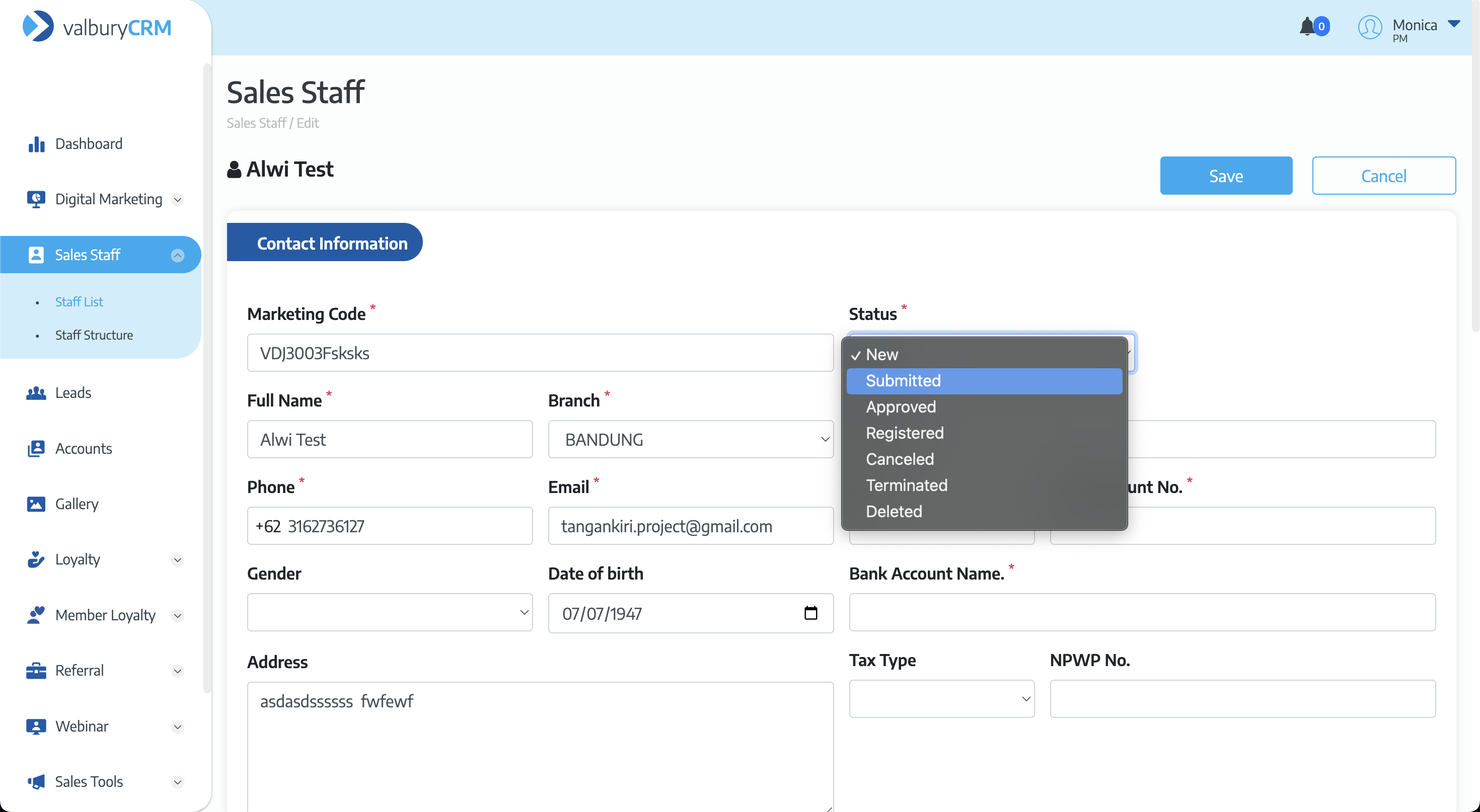
<img src="https://2956386150-files.gitbook.io/~/files/v0/b/gitbook-x-prod.appspot.com/o/spaces%2FvFIDgYJZjVR6TE8RehtK%2Fuploads%2FviMruS8y63LAygREuUhZ%2FScreenshot%202023-02-21%20at%2014.50.41.png?alt=media&#x26;token=a374bff9-4aad-4945-bc43-c3f68121bb6c" alt="" data-size="original">

</details>

<details>

<summary>Add Makassar branch to CRM</summary>

When you create the staff in staff list, you can choose the Makassar branch and group that candidate for Makassar branch.
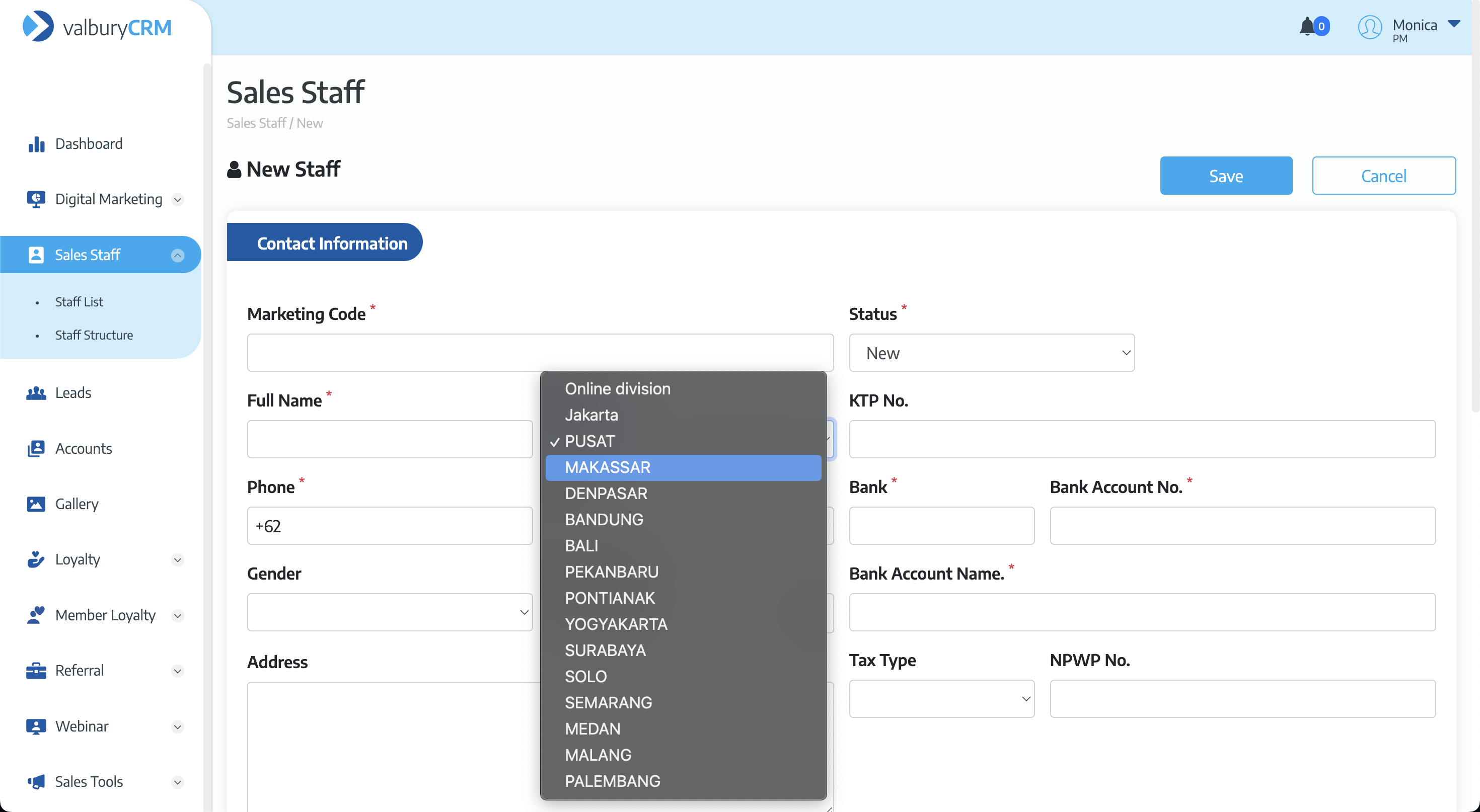
<img src="https://2956386150-files.gitbook.io/~/files/v0/b/gitbook-x-prod.appspot.com/o/spaces%2FvFIDgYJZjVR6TE8RehtK%2Fuploads%2FvHCTvgSDEjwqgz4FQtmO%2FScreenshot%202023-02-21%20at%2014.56.28.png?alt=media&#x26;token=4d497780-153b-40d0-9e9d-6a8f8b82cd72" alt="" data-size="original">

</details>

<details>

<summary>FC Code validation when creating leads in CRM</summary>

When user creates new leads in CRM, they have to fill in the FC Code and if the FC Code is not filled then there will be a validation when saving the leads -> `FC (Marketing Code) is not valid`

<img src="https://2956386150-files.gitbook.io/~/files/v0/b/gitbook-x-prod.appspot.com/o/spaces%2FvFIDgYJZjVR6TE8RehtK%2Fuploads%2FQRFu8oYferzKDL87wOWT%2FScreenshot%202023-02-21%20at%2014.54.10.png?alt=media&#x26;token=1ea8d2f3-7d69-4a3e-a342-c1d17ae1d157" alt="" data-size="original">

</details>

<details>

<summary>Select Email Target in Email Broadcast</summary>

In Email Target, the list of users are appear in pages and you can see how many user's duplicated and invalid.

![](https://2956386150-files.gitbook.io/~/files/v0/b/gitbook-x-prod.appspot.com/o/spaces%2FvFIDgYJZjVR6TE8RehtK%2Fuploads%2FPjogbijfTaqwAY8WxnAx%2FScreenshot%202023-03-08%20at%2015.51.10.png?alt=media\&token=207a31d5-c563-4eac-8589-55c0c425b2a8)

To select the user in this page, you can click the checkbox in header. You will see how many users are selected before you sent the broadcast.

![](https://2956386150-files.gitbook.io/~/files/v0/b/gitbook-x-prod.appspot.com/o/spaces%2FvFIDgYJZjVR6TE8RehtK%2Fuploads%2FQZswE7GaihRSerSY7eOh%2FScreenshot%202023-03-08%20at%2016.04.28.png?alt=media\&token=09250875-c496-4ed9-acfa-ebf75a3e2b2b)

![](https://2956386150-files.gitbook.io/~/files/v0/b/gitbook-x-prod.appspot.com/o/spaces%2FvFIDgYJZjVR6TE8RehtK%2Fuploads%2F6tMZY28jUTEjLsS4OTLS%2FScreenshot%202023-03-08%20at%2015.38.27.png?alt=media\&token=a987763a-da3e-44e8-9e2a-331a4f9b6742)

To select all users, you can click the dropdown button and choose `Select All`. You will see how many users are selected before you sent the broadcast.

![](https://2956386150-files.gitbook.io/~/files/v0/b/gitbook-x-prod.appspot.com/o/spaces%2FvFIDgYJZjVR6TE8RehtK%2Fuploads%2F1D4m3N4HGaBwMCaQPSWc%2Fselect%20all.png?alt=media\&token=05d53c74-8f66-45df-8297-89798cf29a19)

![](https://2956386150-files.gitbook.io/~/files/v0/b/gitbook-x-prod.appspot.com/o/spaces%2FvFIDgYJZjVR6TE8RehtK%2Fuploads%2Fy4FuaC69DJNWmT5rDI23%2Fselected%20all.png?alt=media\&token=d9960308-ae3a-491b-a030-1d6cc489de77)

To deselect All users, you can click the dropdown button and choose `Deselect All`. The user's checkbox will be unselected.

![](https://2956386150-files.gitbook.io/~/files/v0/b/gitbook-x-prod.appspot.com/o/spaces%2FvFIDgYJZjVR6TE8RehtK%2Fuploads%2FiC5Fnr7vLy2IKyX4Ps0R%2Fdeselect.png?alt=media\&token=7ae47053-3258-4ed1-a9c4-b682eca1ec0b)

To select only the duplicated, you can click the dropdown button and choose `Select Duplicated`. You will see how many users are selected before you sent the broadcast.

![](https://2956386150-files.gitbook.io/~/files/v0/b/gitbook-x-prod.appspot.com/o/spaces%2FvFIDgYJZjVR6TE8RehtK%2Fuploads%2FQ8ayCsU502lISOBbFJOb%2Fselect%20duplicate.png?alt=media\&token=9ee65793-36b5-4f55-a23a-cf1d0021476c)

![](https://2956386150-files.gitbook.io/~/files/v0/b/gitbook-x-prod.appspot.com/o/spaces%2FvFIDgYJZjVR6TE8RehtK%2Fuploads%2FIs0htMlpLz50TLTHhAg9%2Fselected%20duplicate.png?alt=media\&token=f1f8b568-4a3e-43c1-8dc3-f3ae338a4d45)

To select only the invalid user, you can click the dropdown button and choose `Select Invalid`. You will see how many users are selected before you sent the broadcast.

![](https://2956386150-files.gitbook.io/~/files/v0/b/gitbook-x-prod.appspot.com/o/spaces%2FvFIDgYJZjVR6TE8RehtK%2Fuploads%2FrxQ7tLdTU8xGumrFncfB%2FScreenshot%202023-03-08%20at%2016.43.40%20copy.png?alt=media\&token=5dac46ee-fca3-43a3-adb8-c3004fea5a3f)

![](https://2956386150-files.gitbook.io/~/files/v0/b/gitbook-x-prod.appspot.com/o/spaces%2FvFIDgYJZjVR6TE8RehtK%2Fuploads%2FJZFJG33rTa3FAq0UqaRG%2FScreenshot%202023-03-08%20at%2015.39.48.png?alt=media\&token=aa620aa5-0b04-46e9-b1d9-13f229b9ba4a)

</details>

<details>

<summary>Valbury Coin</summary>

## Valbury Coin Admin

This page is used by administrator to search, filter, view, approved or disapprove redeem request, create a gift to redeem, and view the list of user's coins.

### Redeem

This page is used to view the list of marketing that already request to redeem gift, only admin can approve or reject the request.

This request have several status :&#x20;

* Pending -> When new request shows up on the list
* Approved -> When the request is approved by admin
* Rejected -> When the request is rejected by admin

![](https://2956386150-files.gitbook.io/~/files/v0/b/gitbook-x-prod.appspot.com/o/spaces%2FvFIDgYJZjVR6TE8RehtK%2Fuploads%2FKxzT5JTrtOf0s0Px7kiV%2FScreenshot%202023-03-27%20at%2014.02.07.png?alt=media\&token=616e28fa-c414-4c21-b9f9-461e19edc935)

* To approve the request, admin can click `Approve` and pop-up confirmation will appear, click the `Approve` button to confirm\
  ![](https://2956386150-files.gitbook.io/~/files/v0/b/gitbook-x-prod.appspot.com/o/spaces%2FvFIDgYJZjVR6TE8RehtK%2Fuploads%2F7l1yFVpc9QpCx3oclOpR%2Fimage.png?alt=media\&token=2fa0c05b-5e26-4dc3-abcb-3be7c5dd81ed)
* To reject the request, admin can click `Reject` button and pop-up confirmation will appear, click the `Reject` button to confirm.\
  ![](https://2956386150-files.gitbook.io/~/files/v0/b/gitbook-x-prod.appspot.com/o/spaces%2FvFIDgYJZjVR6TE8RehtK%2Fuploads%2FxdC1jKHLt8Dkw9USwJRS%2Fimage.png?alt=media\&token=18acc7ab-dfbb-4871-855e-bd83970c9d0c)
* Admin can also search and filter the request by their status and the product redeemed.

### Gift List

This page is used to view, add, edit and delete gift that can be redeemed by by each marketing.

![](https://2956386150-files.gitbook.io/~/files/v0/b/gitbook-x-prod.appspot.com/o/spaces%2FvFIDgYJZjVR6TE8RehtK%2Fuploads%2FPb3foTPMeJO1JdawAx71%2FScreenshot%202023-03-27%20at%2014.03.26.png?alt=media\&token=39968bfa-bd7f-4b5f-9d34-4d23bee0e7ca)

* **Create Gift**\
  To create the gift, admin can click `Add New Item` then pop-up add gift will appear, fill in all the details and click `Save`. The gift will successfully added and can be redeemed.\
  ![](https://2956386150-files.gitbook.io/~/files/v0/b/gitbook-x-prod.appspot.com/o/spaces%2FvFIDgYJZjVR6TE8RehtK%2Fuploads%2FqDx6VEYYXqOds1Yz0FxB%2Fimage.png?alt=media\&token=b839debe-97ba-4a1a-9055-e8c7592c4601)
* **Edit Gift**\
  To edit the gift, admin click the edit icon then pop-up edit gift will appear. You can edit the details and click `Save` to keep the changes\
  ![](https://2956386150-files.gitbook.io/~/files/v0/b/gitbook-x-prod.appspot.com/o/spaces%2FvFIDgYJZjVR6TE8RehtK%2Fuploads%2FBVvITvYgm87MeQcsGqT9%2Fimage.png?alt=media\&token=f6028e77-8c89-42c8-b7e9-196436bcc4e3)
* **Delete Gift**\
  To delete the gift, click the delete icon and pop-up confirmation will appear. Click `Delete` to delete the gift.\
  ![](https://2956386150-files.gitbook.io/~/files/v0/b/gitbook-x-prod.appspot.com/o/spaces%2FvFIDgYJZjVR6TE8RehtK%2Fuploads%2FGBQHFU8yazQaseJ1Jlfj%2Fimage.png?alt=media\&token=bbda364f-8357-45d1-83ec-b3e0991dc0a7)

### Marketing Coins

This page is used to view the coins achieved by each marketing.

![](https://2956386150-files.gitbook.io/~/files/v0/b/gitbook-x-prod.appspot.com/o/spaces%2FvFIDgYJZjVR6TE8RehtK%2Fuploads%2FE5XbgUA5KD54LA1cr7Vm%2Fimage.png?alt=media\&token=adb3920b-9419-43ff-851c-f66da78b0f1f)

Fields description :&#x20;

![](https://2956386150-files.gitbook.io/~/files/v0/b/gitbook-x-prod.appspot.com/o/spaces%2FvFIDgYJZjVR6TE8RehtK%2Fuploads%2FGSUHhW3VoTDzrknQr59M%2FScreenshot%202023-03-27%20at%2014.11.13.png?alt=media\&token=05789142-6612-4328-96e8-7c276a9bdea1)

If you click on the name or the view icon, you will see the detail of each customer produce how many coins for this sales marketing.

![](https://2956386150-files.gitbook.io/~/files/v0/b/gitbook-x-prod.appspot.com/o/spaces%2FvFIDgYJZjVR6TE8RehtK%2Fuploads%2F27HmckOLrljmNrngpkvH%2Fimage.png?alt=media\&token=e3366bb7-72a8-46c5-b72e-f16995567fbc)

Fields description :&#x20;

![](https://2956386150-files.gitbook.io/~/files/v0/b/gitbook-x-prod.appspot.com/o/spaces%2FvFIDgYJZjVR6TE8RehtK%2Fuploads%2FnTtE7z2duxKPvYTZMgIt%2FScreenshot%202023-03-27%20at%2014.11.34.png?alt=media\&token=24e8ba82-c406-4216-a5e5-86cb0dea5bd9)

## Valbury Coin

This page is used by Marketing to redeem gifts from accumulated coin they already achieve and view their history of redeem request.

### Accounts

This page is used to view the list of customer who used your sales reference and how many coins they produced.

![](https://2956386150-files.gitbook.io/~/files/v0/b/gitbook-x-prod.appspot.com/o/spaces%2FvFIDgYJZjVR6TE8RehtK%2Fuploads%2FhGoyaW6qD46zAHY8PFbM%2Fimage.png?alt=media\&token=78eb36eb-2fc8-41b3-bbef-c26483101dfd)

Fields description :&#x20;

![](https://2956386150-files.gitbook.io/~/files/v0/b/gitbook-x-prod.appspot.com/o/spaces%2FvFIDgYJZjVR6TE8RehtK%2Fuploads%2FdtuisOxvJBMZITmmMvGX%2FScreenshot%202023-03-27%20at%2014.08.45.png?alt=media\&token=d4389a50-dec4-4159-aade-f45eb34f2b19)

### Redeem Gifts

This page is used to request redeem gift based on Marketing's coin, they can view the list of gifts, search and filter the gifts based on category. When the gift's coin required is above their coins, the `Redeem` button is disabled.

![](https://2956386150-files.gitbook.io/~/files/v0/b/gitbook-x-prod.appspot.com/o/spaces%2FvFIDgYJZjVR6TE8RehtK%2Fuploads%2FJVWYgp6AhrgDjzHLjcnU%2FScreenshot%202023-03-27%20at%2014.04.03.png?alt=media\&token=cd7b6955-b6d1-48ca-8b61-ee32b0656d70)

### History

This page is used to view the history redeem request, search and filter the request by status and date. To view the detail of each redeem request, you can click on the `Detail` button

![](https://2956386150-files.gitbook.io/~/files/v0/b/gitbook-x-prod.appspot.com/o/spaces%2FvFIDgYJZjVR6TE8RehtK%2Fuploads%2FSUyxZzRTSIqfVxeLQvEr%2FScreenshot%202023-03-27%20at%2014.04.26.png?alt=media\&token=f3e25735-efe6-4db9-b748-ffa17cf89ca8)

Fields description :&#x20;

![](https://2956386150-files.gitbook.io/~/files/v0/b/gitbook-x-prod.appspot.com/o/spaces%2FvFIDgYJZjVR6TE8RehtK%2Fuploads%2FGRfL3ZQXW53mMLAKt4eG%2FScreenshot%202023-03-27%20at%2014.24.37.png?alt=media\&token=10df4e4f-290d-468d-8e79-b8ae49b1d7f1)

</details>

<details>

<summary>Update Mapping for IB Code</summary>

#### Before

IB code can be inputted from our 4 channels : Website, Apps, MyTrade, and landing pages (from sales or company landing page). From these channels we categorize the leads origin, if it's from Website then it's CRM leads, and from Apps, MyTrade and landing pages goes to AREMA's leads.

The existing code for each online/offline sales consist of 3 digit of division code and 4 digit of sales code, but the IB code consist of 4 digit of division code and 4 digit of sales code. So when the system wants to read the IB code, it doesn't know where this IB is coming from.

#### After

On tech side, we change the mapping for IB code to be able to read which owner of this IB belongs to.

</details>
